🎁 New here? Get 10% off orders over $100 with code NEWUSER🛡 Verified freelancers with security deposit protection💳 Pay by UPI, cards or crypto💬 Chat live with freelancers before you hire

Author: admin

  • Google Merchant Center Suspended? How to Fix Misrepresentation and Get Reinstated

    Google Merchant Center Suspended? How to Fix Misrepresentation and Get Reinstated

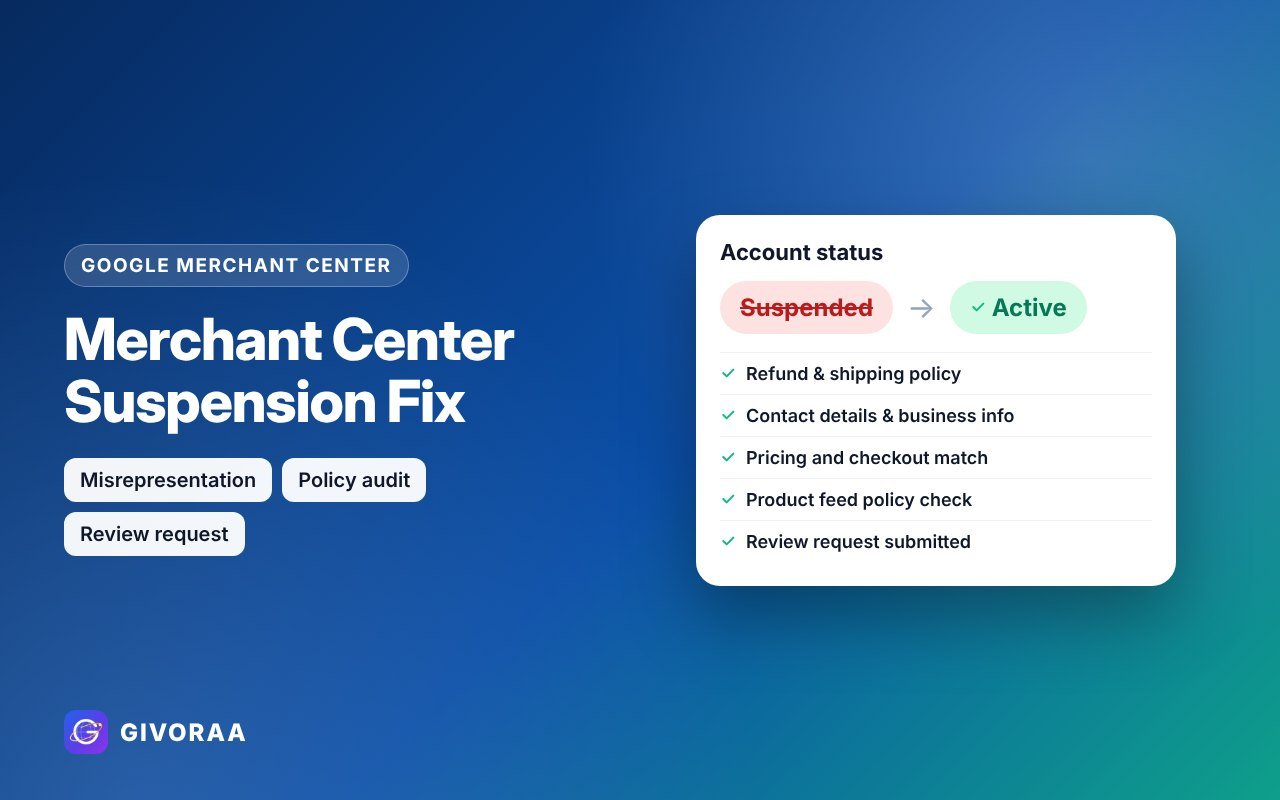
    A suspended Google Merchant Center account stops all your products from showing on Google Shopping – both free listings and ads. The good news: most suspensions are caused by fixable website issues. This guide shows the usual reasons, a complete fix checklist and how to request a review.

    Why accounts get suspended

    Misrepresentation

    Google can’t trust the business: missing contact details, unclear policies, unrealistic offers or copied content.

    Website needs improvement

    Broken checkout, placeholder text, missing pages or products not available to buy.

    Policy violations

    Prohibited or restricted products, or mismatched price and stock data.

    The fix checklist

    1. Business identity and contact

    • Business name the same on your website, Merchant Center and invoices
    • Real email, phone number and (where possible) physical address
    • An “About us” page that explains who you are

    2. Policies customers can find

    • Return & refund policy – time window, who pays return shipping, how refunds are paid
    • Shipping policy – costs, countries and delivery times
    • Privacy policy and terms
    • Links to all policies in the footer

    3. Products and checkout

    • Price, currency and stock the same on the page and in the feed
    • No fake discounts, countdowns or “100% guaranteed” claims
    • Secure checkout (HTTPS) with clear payment methods
    • No placeholder text, broken links or empty categories

    4. Feed clean-up

    • Remove restricted or prohibited products
    • Fix every item in Diagnostics
    • Use correct brand and GTIN data

    How to request a review

    1. Fix everything above first – a rushed review that fails can lead to a cool-down period before you can ask again.
    2. Open the account issue in Merchant Center and choose Request review.
    3. Answer honestly about the changes you made.
    4. Wait for the result – usually a few days. Keep the website unchanged during review.

    No one can guarantee reinstatement – Google makes the final decision. What an expert can do is find and fix every issue before you submit.

    Get your account back with expert helpSuspension fix from $90 – full website and feed audit plus a prepared review request.

    Order suspension fix

    Prevent it next time

    FAQ

    How long does a Merchant Center review take?

    Usually several days, sometimes longer for misrepresentation reviews.

    Can I open a new account instead?

    Creating new accounts to get around a suspension breaks Google’s rules and can make things worse. Fix the original account.

    Does a suspension affect my Google Ads?

    Shopping and Performance Max ads that use the feed stop. Search ads can still run.

  • Google Merchant Center Setup Guide 2026: Get Your Products on Google Shopping

    Google Merchant Center Setup Guide 2026: Get Your Products on Google Shopping

    If you sell products online, Google Merchant Center is how your products get onto Google Shopping, the Shopping tab, Google Images and even YouTube. It is free to set up, and with free product listings you can get clicks without paying for ads. This guide explains every step in simple words.

    What is Google Merchant Center?

    Google Merchant Center is Google’s dashboard for online stores. You give Google your store details and a product feed (a list of your products with title, price, image, stock and more). Google checks the products against its policies and then shows them in its shopping results. The same feed is used by Google Ads for Shopping and Performance Max campaigns.

    Free listings

    Products show for free on the Shopping tab and other Google surfaces. You pay nothing per click.

    Shopping ads

    Paid ads with image and price at the top of Google Search, run from Google Ads.

    One feed

    One product feed powers both free listings and ads, so a clean feed matters most.

    What you need before you start

    • A website with a working checkout and real products in stock
    • Clear contact details (email, phone or address)
    • Refund / return, shipping, privacy and terms pages
    • Product pages with the same price and stock you send to Google
    • A Google account (ideally a business account, not personal)

    Missing policies or contact details are the most common reason new accounts get suspended for “misrepresentation”. Fix these first.

    Step-by-step setup

    1. Create the account at Google Merchant Center and enter your business name, country and website.
    2. Verify and claim your website – using Google Search Console, a meta tag or Google Analytics.
    3. Add shipping settings – rates and delivery times for each country you sell to.
    4. Add your return policy – window, cost and conditions.
    5. Upload products – connect Shopify or WooCommerce with an app/plugin, use a Google Sheet, or a scheduled feed file.
    6. Turn on free listings and link Google Ads if you want Shopping campaigns.
    7. Check Diagnostics – fix every disapproved or limited product.

    Product feed: the attributes that matter most

    Attribute Tip
    Title Brand + product type + key detail (size, colour, model). Put the most important words first.
    Description Clear, factual, no promotional text like “best price” or “free shipping”.
    Image Clean product photo, no watermarks or big text overlays.
    Price & availability Must match your product page exactly.
    GTIN / MPN / Brand Add GTIN (barcode) for branded products – it improves approval and visibility.
    Google product category Choose the most specific category.
    Custom labels Group products by margin, season or best sellers for smarter ads.

    Common problems and quick fixes

    • Price mismatch – your feed and page show different prices (often because of currency or sale price). Sync them.
    • Missing GTIN – add barcodes, or set “identifier exists = no” only for genuine custom products.
    • Image too small or has text – use a clean image, at least 500×500px.
    • Account suspended – read our guide: how to fix a Merchant Center suspension.
    Let an expert set it up for youMerchant Center setup from $60 – verification, shipping, returns and free listings.

    See Merchant Center services

    Free listings or Shopping ads?

    Start with free listings – they cost nothing and show you which products get attention. When you are ready to grow, run Google Shopping or Performance Max campaigns from the same feed. Read our Google Ads guide to plan your budget.

    FAQ

    Is Google Merchant Center free?

    Yes. The account and free listings are free. You only pay if you run Shopping ads in Google Ads.

    How long does approval take?

    Product review usually takes a few days. Website and account reviews can take longer.

    Can I use Merchant Center with Shopify or WooCommerce?

    Yes. Both connect with an official app or plugin that keeps price and stock in sync. See our feed integration service.

    Do I need a GTIN for every product?

    For branded products that have barcodes, yes. Handmade or custom products can be submitted without one.

  • GIVORAA Refund Policy and Buyer Protection Explained

    GIVORAA Refund Policy and Buyer Protection Explained

    Every order paid on GIVORAA is protected. If the work is not what was agreed, you can ask for changes and, if needed, request a refund review. Here is how it works in simple steps.

    Your protection at a glance

    Revisions

    Every package includes revisions – shown on the package before you order.

    15-day review

    Request a review within 15 days of your order if a problem is not solved.

    Human support

    The GIVORAA team checks the agreed scope, messages and delivery fairly.

    Step 1: Ask for a revision first

    Most issues are solved with clear feedback. Tell the freelancer exactly what to change in chat – for example “change the background to white and make the text larger”.

    Step 2: Request a refund review

    1. Go to Refund request (or My Account → Refunds).
    2. Choose your order and the reason.
    3. Describe what was agreed and what went wrong.
    4. Attach evidence such as screenshots or files.
    5. Submit – you receive a case ID by email.

    Step 3: Review and decision

    The GIVORAA team reviews both sides and emails you the decision. Depending on the case, the outcome can be a redelivery, a partial refund or a full refund, as described in the refund policy.

    Tips for a fast resolution

    • Keep all agreements in GIVORAA chat.
    • Be specific and include screenshots.
    • Request the review within 15 days.

    Paid a freelancer directly?

    Payments made outside GIVORAA are not covered by the refund policy. Protect them with a security deposit block before you pay.

    Need help with an order?Our support team is here for you.

    Open a ticket

    FAQ

    How long does a refund review take?

    We aim to respond quickly by email with your case ID and keep you updated until it is resolved.

    Where can I read the full policy?

    On the Refund Policy page and in the Terms of Service.

  • Live Chat with Freelancers on GIVORAA: How Messages Work

    Live Chat with Freelancers on GIVORAA: How Messages Work

    Talking to a freelancer before you hire saves time and avoids misunderstandings. GIVORAA has built-in live chat so clients and freelancers can agree details quickly and keep everything in one safe place.

    For clients: start a chat

    1. Open a freelancer profile from Find Freelancers.
    2. Click 💬 Chat with [name].
    3. Sign in (or create a free account) and send your message.
    4. Find all conversations under Messages or My Account → Messages.

    For freelancers: never miss a client

    • New conversations arrive in your Messages page and freelancer dashboard.
    • You receive an email when a client messages you, with a secure link to reply quickly – even without signing in to the dashboard.
    • Reply fast: quick answers win more clients. Read how to win your first clients.

    What to discuss in chat

    • Scope and deliverables
    • Price, timeline and revisions
    • Files, references and access you will share
    • Milestones for bigger projects

    Then order a package or accept a proposal, and pay through GIVORAA so you are protected by the refund policy.

    Safety in chat

    • Never share passwords, OTPs, card numbers or wallet keys.
    • Be careful with requests to move to another app before work is agreed.
    • Conversations may be reviewed by the GIVORAA support team to keep the marketplace safe and to help resolve disputes. Messages from the team are clearly tagged.

    Read Trust and Safety and how to pay freelancers safely.

    Find a freelancer and say helloVerified profiles from around the world.

    Find freelancers

    FAQ

    Is chat free?

    Yes, messaging is free for clients and freelancers.

    Can I share files?

    Share links to files (for example a cloud folder). Never share private passwords in chat.

  • How to Post a Job and Get Great Proposals on GIVORAA

    How to Post a Job and Get Great Proposals on GIVORAA

    When your project is unique or bigger than a ready-made package, post a job. It is free, takes about five minutes, and freelancers whose skills match your project are notified by email.

    Step 1: Sign in

    Create a free account or sign in on My Account, then open Post a job.

    Step 2: Fill in the job form

    Project title – short and specific, e.g. “Build a 5-page WordPress website for my bakery”.

    Service category – helps us match the right freelancers.

    Describe your project – goal, deliverables, examples and anything important. Use our brief template.

    Budget (USD) – a fixed price or an hourly rate.

    When do you need it? – urgent, 1 week, 2 weeks, 1 month or flexible.

    Skills needed – e.g. “WordPress, Elementor, SEO”.

    Location – leave empty for remote / worldwide.

    Step 3: Preview and publish

    Check the preview and publish. Your job appears on Find work and matching freelancers receive an alert.

    Step 4: Compare proposals

    Each proposal shows the freelancer’s price, delivery time, cover letter, milestones and portfolio link. Open your job page to review them. Compare:

    • Did they understand your goal?
    • Is the plan clear, with realistic milestones?
    • Do they have relevant samples and a verified profile?

    Ask questions in live chat before deciding.

    Step 5: Hire and pay

    Click Hire & pay on the proposal you choose. A secure contract is created at the agreed price and you go straight to checkout. Other pending proposals are closed automatically and the job is marked as filled when payment is confirmed.

    Post your job for freeGet proposals from verified freelancers worldwide.

    Post a job

    FAQ

    How much does it cost to post a job?

    Nothing. You only pay when you hire.

    How many proposals will I get?

    It depends on your category and budget. Clear briefs with realistic budgets get more and better proposals.

    Can I edit or close my job?

    Yes, from My job posts.

  • How to Pay on GIVORAA: Cards, UPI and Crypto (Step by Step)

    How to Pay on GIVORAA: Cards, UPI and Crypto (Step by Step)

    GIVORAA accepts payments from customers worldwide. You can pay with a card, UPI (India) or cryptocurrency. Prices are shown in USD; UPI payments are converted to INR at checkout.

    Step 1: Choose your service and package

    Open any service, choose Basic, Standard or Premium, add an optional project brief and click Continue. Not sure which to choose? Read freelance prices explained.

    Step 2: Apply a discount (optional)

    New customer? Enter NEWUSER at checkout for 10% off orders over $100 (one use per customer).

    Step 3: Pick a payment method

    💳 Card

    Pay instantly with your debit or credit card through the secure payment gateway. Your order starts straight away.

    🇮🇳 UPI

    Pay the INR amount shown to the GIVORAA UPI ID from any UPI app, then enter the 12-digit UTR (transaction reference) on the order page.

    🪙 Crypto

    Send the exact amount to the wallet shown (for example USDT on the listed network), then submit the transaction hash.

    Step 4: What happens after you pay

    • Card – the order is confirmed immediately.
    • UPI and crypto – the order is On hold until our team verifies your UTR or transaction hash, then it moves to Processing and you receive an email.
    • You can follow every order under My Account → Orders.

    Tips for a smooth payment

    • Pay the exact amount shown, in the currency shown.
    • For crypto, use the correct network – sending on the wrong network can lose funds.
    • Each UTR or hash can be used only once.
    • Never share card numbers, OTPs or wallet keys in chat.
    Ready to order?550+ fixed-price packages with transparent prices.

    Browse services

    FAQ

    Can I get a refund?

    Yes – request a review within 15 days under the refund policy.

    How long does UPI or crypto verification take?

    Usually within business hours on the same day. You will receive an email once it is confirmed.

    Are there extra fees?

    No hidden fees. See pricing and fees. Crypto network fees are paid by the sender.

  • GIVORAA Security Deposit and Payment ID Explained (For Clients and Freelancers)

    GIVORAA Security Deposit and Payment ID Explained (For Clients and Freelancers)

    The GIVORAA security deposit protects clients who pay a freelancer directly, outside a normal order. The freelancer keeps a deposit with GIVORAA, and the client can ask GIVORAA to block part of it as a guarantee until the work is delivered.

    Key terms in one minute

    Payment ID

    A unique ID for each freelancer, like GVP-7K4M2Q. Clients use it to look up the freelancer.

    Security deposit

    Money the freelancer adds to their GIVORAA deposit to show they are trustworthy.

    Block

    A part of the deposit held for one client and one service until it is released.

    For clients: how to protect a direct payment

    1. Ask the freelancer for their Payment ID.
    2. Open Verify a freelancer and enter the ID. You will see the name, verified tick and the deposit available to block.
    3. Fill in your name, email, the service you agreed and the amount, then send the block request.
    4. Wait until the request shows Blocked. Only then pay the freelancer.
    5. When the work is done, click Release. If something goes wrong, click Report a problem and the GIVORAA team reviews both sides.

    You receive a private tracking link by email, and if you are signed in, every request appears under My Account → Protected payments.

    For freelancers: why add a deposit?

    • Clients can verify you before paying – this wins bigger direct projects.
    • Every completed protected deal adds a badge clients can see.
    • You stay in control: you accept or decline each block request.

    Manage your deposit, Payment ID and requests on the Security Deposit dashboard. Top-ups can be paid by UPI or crypto, and you can withdraw your available balance.

    What happens in a dispute?

    If a client reports a problem, the blocked amount stays held. The GIVORAA team reviews the agreed service, messages and delivery from both sides. If the claim is upheld, the blocked amount is paid to the client from the freelancer’s deposit; otherwise it is released back to the freelancer. See Trust and Safety.

    Important to know

    • GIVORAA does not receive or handle the money you pay directly to the freelancer – the protection comes from the freelancer’s deposit.
    • You can only block up to the freelancer’s available deposit.
    • Blocks that are not answered expire automatically.
    Paying a freelancer directly?Check their Payment ID first – it takes 2 minutes.

    Verify a freelancer

    FAQ

    Is the security deposit the same as a GIVORAA order?

    No. Orders placed on GIVORAA are covered by the refund policy. The security deposit protects payments you make directly to a freelancer.

    Can I block more than the deposit?

    No. The maximum is the freelancer’s available deposit shown on the verify page.

    Where can I see my requests?

    In the email tracking link, or under My Account → Protected payments when signed in.

  • What Is GIVORAA? The Worldwide Freelance Marketplace Explained

    What Is GIVORAA? The Worldwide Freelance Marketplace Explained

    GIVORAA (“Your Skills. Your World.”) is a worldwide freelance services marketplace. Businesses and individuals use it to hire skilled freelancers for design, development, AI, marketing, writing, video and business support – and freelancers use it to find clients anywhere in the world.

    How GIVORAA works for clients

    1. Choose a package – browse 50 service categories with 550+ fixed-price Basic, Standard and Premium packages.
    2. Or post a job – describe your project, set a budget and receive proposals from freelancers.
    3. Chat before you hire – ask questions in live chat.
    4. Pay securely – by card, UPI or crypto.
    5. Receive your work – request revisions, approve and leave a review.

    Read the full guide: How to hire a freelancer online.

    How GIVORAA works for freelancers

    • Join free on Become a freelancer and complete your profile.
    • Get verified – approved profiles show a blue tick on Find Freelancers.
    • Get matched – GIVORAA emails you new projects that match your category and skills.
    • Send proposals with price, timeline and milestones on Find work.
    • Earn – the commission is 5% (you keep $95 of a $100 contract). See pricing and fees.

    Read: How to become a successful freelancer.

    Services and prices

    Popular categories include logo design, website development, WordPress, Shopify, AI automation, chatbots, video editing, SEO, content writing, translation and virtual assistance. Every package shows its price, delivery time and revisions before you order. See freelance prices explained.

    Payments

    GIVORAA accepts cards, UPI and cryptocurrency (such as USDT). UPI and crypto orders are confirmed after our team verifies your UTR or transaction hash. Details: payment methods and how to pay on GIVORAA.

    Safety and protection

    Support worldwide

    Need help? Visit the Help centre, open a support ticket or email support@givoraa.com. GIVORAA has a presence in the USA, UAE, France and India, and the website can be read in 24 languages using the 🌐 language button.

    Start with GIVORAA todayNew customers: 10% off orders over $100 with code NEWUSER.

    Explore services

    FAQ

    Is GIVORAA free to join?

    Yes. Creating an account, posting a job and joining as a freelancer are free.

    Which countries does GIVORAA serve?

    GIVORAA is worldwide. Clients and freelancers from any country can use it.

    Who delivers the fixed-price packages?

    Packages are delivered by vetted GIVORAA specialists. For custom work, post a job and choose from freelancer proposals.

    How do I contact GIVORAA?

    Use the contact page, a support ticket or email support@givoraa.com.

  • Como contratar um freelancer online: guia fácil (Português)

    Como contratar um freelancer online: guia fácil (Português)

    Contratar um freelancer é a forma mais rápida de conseguir um logotipo, um site, um vídeo ou um chatbot com IA sem contratar alguém fixo. No GIVORAA você encontra freelancers verificados do mundo todo. Este guia explica, passo a passo, como escolher bem e pagar com segurança.

    1. Defina o que você precisa

    • Objetivo: que problema o trabalho vai resolver?
    • Entregas: os arquivos ou resultados exatos.
    • Exemplos: 2 ou 3 links de que você gosta.
    • Prazo: para quando você precisa?

    2. Defina o orçamento

    Cada serviço tem três pacotes – Basic, Standard e Premium – com preço, prazo e revisões visíveis. Exemplo: design de logotipo a partir de US$ 25 e lojas Shopify a partir de US$ 80.

    3. Duas formas de contratar

    Pedir um pacote

    Para trabalhos comuns: escolha o pacote, adicione o briefing e faça o pedido. Ver as 50 categorias →

    Publicar um trabalho

    Para projetos maiores: informe o orçamento e receba propostas. Publicar é grátis. Publicar trabalho →

    4. Escolha o freelancer certo

    5. Pague com segurança

    No GIVORAA você paga com cartão, UPI ou cripto, e cada pedido é coberto pela política de reembolso de 15 dias. Se pagar diretamente ao freelancer, verifique antes o Payment ID e solicite um bloqueio no depósito de segurança.

    Pronto para começar?Novos clientes ganham 10% de desconto em pedidos acima de US$ 100 com o código NEWUSER.

    Ver serviços

    Perguntas frequentes

    Posso contratar alguém de outro país?

    Sim. O GIVORAA é um marketplace mundial.

    E se eu não ficar satisfeito?

    Peça uma revisão primeiro. Se não resolver, solicite uma análise em até 15 dias.

  • كيف توظّف مستقلاً عبر الإنترنت: دليل سهل (العربية)

    كيف توظّف مستقلاً عبر الإنترنت: دليل سهل (العربية)

    توظيف مستقل هو أسرع طريقة للحصول على شعار أو موقع إلكتروني أو فيديو أو روبوت محادثة بالذكاء الاصطناعي دون توظيف دائم. على GIVORAA تجد مستقلين موثّقين من جميع أنحاء العالم. يشرح هذا الدليل بخطوات بسيطة كيف تختار الشخص المناسب وتدفع بأمان.

    1. حدّد ما تحتاجه

    • الهدف: ما المشكلة التي سيحلّها العمل؟
    • المخرجات: الملفات أو النتائج المطلوبة بالضبط.
    • أمثلة: رابطان أو ثلاثة روابط تعجبك.
    • الموعد النهائي: متى تحتاج العمل؟

    2. حدّد الميزانية

    كل خدمة لها ثلاث باقات – Basic وStandard وPremium – مع السعر ومدة التسليم وعدد التعديلات. مثال: تصميم الشعار يبدأ من 25 دولاراً، والترجمة من 15 دولاراً.

    3. طريقتان للتوظيف

    اطلب باقة جاهزة

    للأعمال الشائعة: اختر الباقة وأضف ملخصك واطلب فوراً. تصفّح 50 فئة →

    انشر وظيفة

    للمشاريع الكبيرة: اكتب ميزانيتك واستقبل عروض المستقلين. النشر مجاني. انشر وظيفة →

    4. اختر المستقل المناسب

    5. ادفع بأمان

    ادفع على GIVORAA بالبطاقة أو UPI أو العملات الرقمية، وكل طلب محمي بسياسة استرداد لمدة 15 يوماً. إذا دفعت للمستقل مباشرة، تحقّق أولاً من Payment ID واطلب حجز مبلغ من وديعة الضمان الخاصة به.

    هل أنت مستعد للبدء؟العملاء الجدد يحصلون على خصم 10% على الطلبات فوق 100 دولار بالرمز NEWUSER.

    تصفّح الخدمات

    أسئلة شائعة

    هل يمكنني توظيف مستقل من بلد آخر؟

    نعم، GIVORAA منصة عالمية.

    ماذا لو لم أكن راضياً؟

    اطلب تعديلاً أولاً، وإذا لم تُحل المشكلة يمكنك طلب مراجعة خلال 15 يوماً.